ETL (Data Pipeline) Diagram Family
ETL/ELT data pipeline diagrams with 17 transformation nodes covering extract, transform, load, and data quality operations.
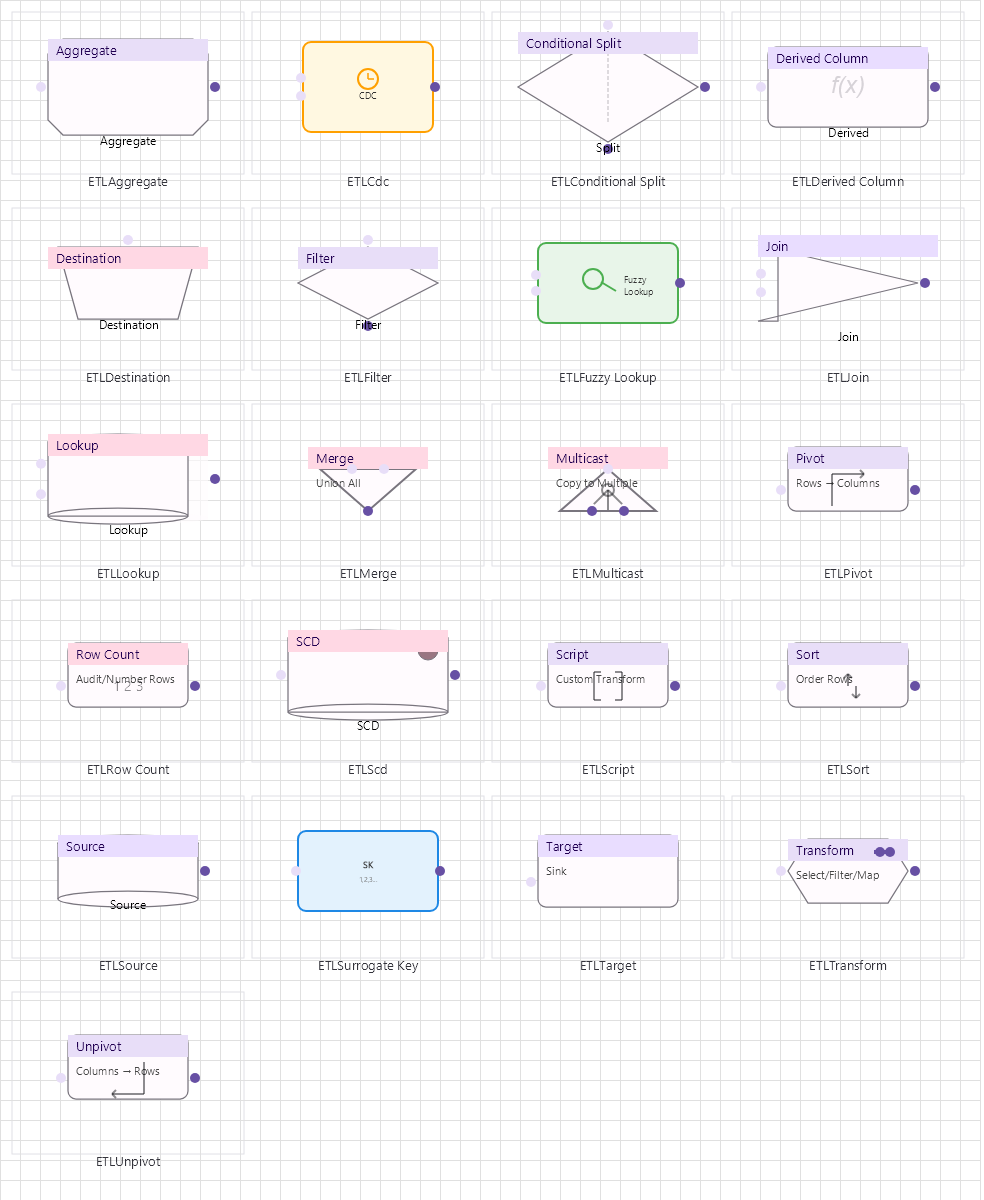
Overview
Base Control: ETLControl : MaterialControl
Namespace: Beep.Skia.ETL
The ETLControl is the root control for this diagram family. It inherits MaterialControl and provides shared port management, styling, and template methods for all nodes in the family.
This family contains 18 node types.
Node Types
| Node Class | Shape | Description |
|---|---|---|
ETLSource | Table/source icon | Data extraction source (database, file, API). |
ETLTransform | Gear/rectangle | Generic data transformation step. |
ETLTarget | Database/target icon | Data loading destination. |
ETLDestination | Target container | Alternative destination node. |
ETLFilter | Funnel | Row-level filtering by condition. |
ETLSort | Arrow up/down | Sort operation on data stream. |
ETLJoin | Merge icon | Join two data streams (inner/left/right/full). |
ETLMerge | Merge (vertical) | Merge/union compatible data streams. |
ETLLookup | Magnifying glass | Reference data lookup/join. |
ETLAggregate | Sigma symbol | Aggregation (SUM, COUNT, AVG, GROUP BY). |
ETLPivot | Arrow rotate | Pivot rows to columns. |
ETLUnpivot | Arrow counter-rotate | Unpivot columns to rows. |
ETLConditionalSplit | Diamond | Route rows to different outputs based on conditions. |
ETLDerivedColumn | Column icon | Compute new column from expression. |
ETLMulticast | Triangle split | Duplicate stream to multiple outputs. |
ETLRowCount | Counter | Count rows passing through. |
ETLScd | Clock icon | Slowly Changing Dimension (Type 1/2/3). |
ETLScript | Code block | Custom script/expression execution. |
ETLSource
Data extraction source (database, file, API).
| Shape | Table/source icon |
|---|---|
| Input Ports | 0 |
| Output Ports | 1+ |
ETLTransform
Generic data transformation step.
| Shape | Gear/rectangle |
|---|---|
| Input Ports | 1+ |
| Output Ports | 1+ |
ETLTarget
Data loading destination.
| Shape | Database/target icon |
|---|---|
| Input Ports | 1+ |
| Output Ports | 0-1 |
ETLDestination
Alternative destination node.
| Shape | Target container |
|---|---|
| Input Ports | 1+ |
| Output Ports | 0 |
ETLFilter
Row-level filtering by condition.
| Shape | Funnel |
|---|---|
| Input Ports | 1 |
| Output Ports | 1 |
ETLSort
Sort operation on data stream.
| Shape | Arrow up/down |
|---|---|
| Input Ports | 1 |
| Output Ports | 1 |
ETLJoin
Join two data streams (inner/left/right/full).
| Shape | Merge icon |
|---|---|
| Input Ports | 2 |
| Output Ports | 1 |
ETLMerge
Merge/union compatible data streams.
| Shape | Merge (vertical) |
|---|---|
| Input Ports | 2+ |
| Output Ports | 1 |
ETLLookup
Reference data lookup/join.
| Shape | Magnifying glass |
|---|---|
| Input Ports | 2 |
| Output Ports | 1 |
ETLAggregate
Aggregation (SUM, COUNT, AVG, GROUP BY).
| Shape | Sigma symbol |
|---|---|
| Input Ports | 1 |
| Output Ports | 1 |
ETLPivot
Pivot rows to columns.
| Shape | Arrow rotate |
|---|---|
| Input Ports | 1 |
| Output Ports | 1 |
ETLUnpivot
Unpivot columns to rows.
| Shape | Arrow counter-rotate |
|---|---|
| Input Ports | 1 |
| Output Ports | 1 |
ETLConditionalSplit
Route rows to different outputs based on conditions.
| Shape | Diamond |
|---|---|
| Input Ports | 1 |
| Output Ports | 2+ |
ETLDerivedColumn
Compute new column from expression.
| Shape | Column icon |
|---|---|
| Input Ports | 1 |
| Output Ports | 1 |
ETLMulticast
Duplicate stream to multiple outputs.
| Shape | Triangle split |
|---|---|
| Input Ports | 1 |
| Output Ports | 2+ |
ETLRowCount
Count rows passing through.
| Shape | Counter |
|---|---|
| Input Ports | 1 |
| Output Ports | 1 |
ETLScd
Slowly Changing Dimension (Type 1/2/3).
| Shape | Clock icon |
|---|---|
| Input Ports | 1 |
| Output Ports | 1 |
ETLScript
Custom script/expression execution.
| Shape | Code block |
|---|---|
| Input Ports | 1+ |
| Output Ports | 1+ |
Connection Points
Every node in this family exposes connection points (ports) for linking to other nodes. Port positions are computed lazily by LayoutPorts(), which runs when MarkPortsDirty() flags the layout as stale after a move or resize.
| Node Class | Input Ports | Output Ports | Extra |
|---|---|---|---|
ETLSource | 0 | 1+ | — |
ETLTransform | 1+ | 1+ | — |
ETLTarget | 1+ | 0-1 | — |
ETLDestination | 1+ | 0 | — |
ETLFilter | 1 | 1 | — |
ETLSort | 1 | 1 | — |
ETLJoin | 2 | 1 | — |
ETLMerge | 2+ | 1 | — |
ETLLookup | 2 | 1 | — |
ETLAggregate | 1 | 1 | — |
ETLPivot | 1 | 1 | — |
ETLUnpivot | 1 | 1 | — |
ETLConditionalSplit | 1 | 2+ | — |
ETLDerivedColumn | 1 | 1 | — |
ETLMulticast | 1 | 2+ | — |
ETLRowCount | 1 | 1 | — |
ETLScd | 1 | 1 | — |
ETLScript | 1+ | 1+ | — |
Connection Conventions
When building diagrams with this family, follow these conventions:
- Flow direction: left to right or top to bottom
- Sources have no input ports, targets have no output ports
- Transforms may have multiple inputs/outputs
- Line colors indicate data flow, error flow, or logging flow
Usage Example
Complete example showing creation, node placement, and connection:
C# Example
var etl = new ETLControl
{
    X = 50, Y = 50,
    Width = 800, Height = 500
};
drawingManager.AddComponent(etl);

var src = new ETLSource { X = 100, Y = 250, Text = "SQL Server" };
var filter = new ETLFilter { X = 280, Y = 250, Text = "Filter Active" };
var transform = new ETLTransform { X = 460, Y = 250, Text = "Normalize" };
var tgt = new ETLTarget { X = 640, Y = 250, Text = "Data Warehouse" };

drawingManager.AddComponent(src);
drawingManager.AddComponent(filter);
drawingManager.AddComponent(transform);
drawingManager.AddComponent(tgt);

drawingManager.ConnectComponents(src.OutPoints[0], filter.InPoints[0]);
drawingManager.ConnectComponents(filter.OutPoints[0], transform.InPoints[0]);
drawingManager.ConnectComponents(transform.OutPoints[0], tgt.InPoints[0]);