FlowChart Diagram Family
Classic flowchart diagrams with 32 node types covering process, decision, I/O, loops, and annotations. Based on ISO 5807 standard shapes.
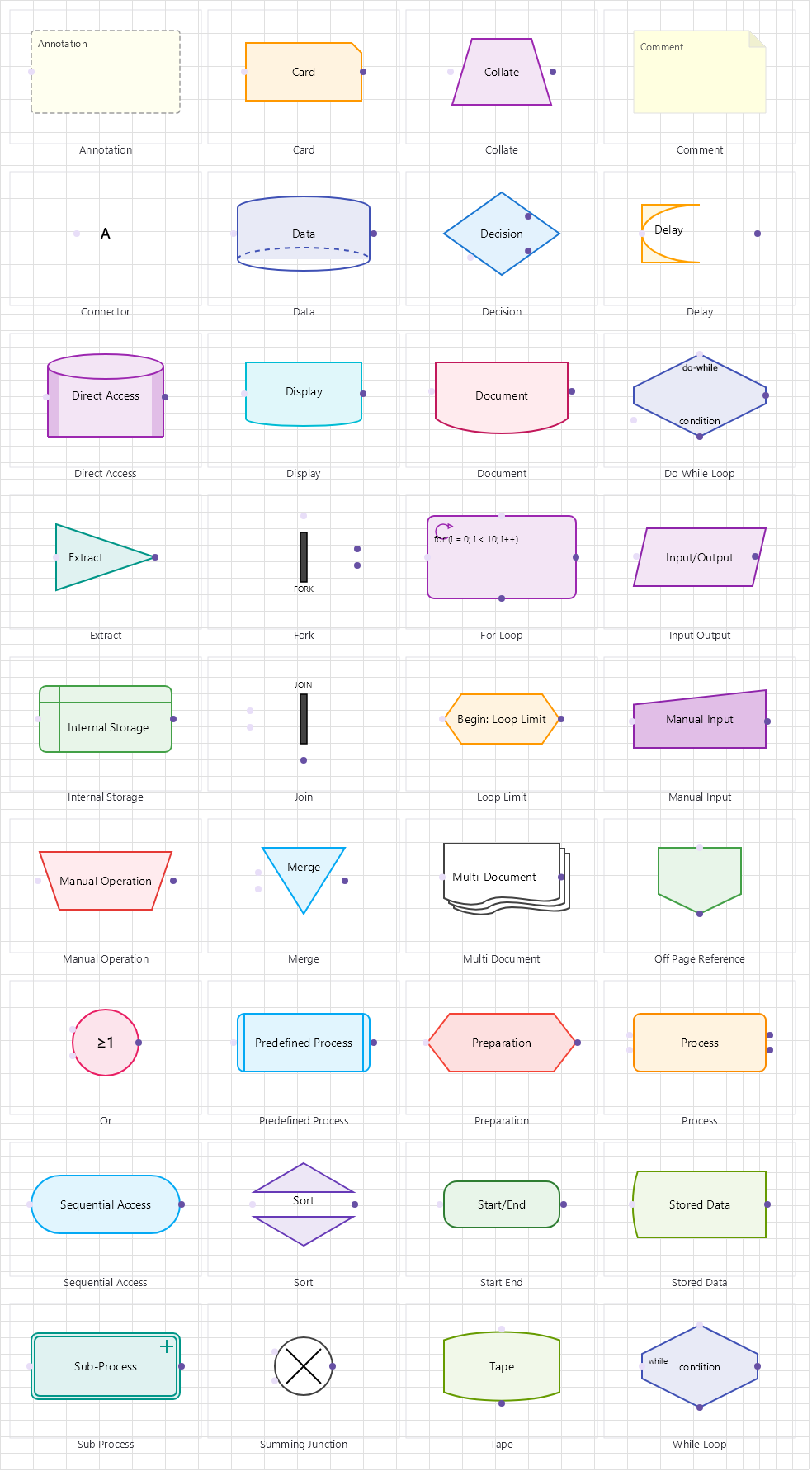
Overview
Base Control: FlowchartControl : MaterialControl
Namespace: Beep.Skia.FlowChart
The FlowchartControl is the root control for this diagram family. It inherits MaterialControl and provides shared port management, styling, and template methods for all nodes in the family.
This family contains 36 node types.
Node Types
| Node Class | Shape | Description |
|---|---|---|
ProcessNode | Rectangle | Standard process/action step. The most common flowchart node. |
DecisionNode | Diamond | Conditional branching. Yes/No or True/False paths. |
StartEndNode | Rounded Rectangle | Start or End terminal. Use NodeType to specify. |
DocumentNode | Document (wavy bottom) | Represents a document or report output. |
DataNode | Parallelogram | Data input/output operation. |
InputOutputNode | Parallelogram | Input or output operation (alternative shape). |
PredefinedProcessNode | Rectangle with vertical bars | Subroutine or predefined process. |
SubProcessNode | Rectangle with vertical bars | Nested sub-process expandable node. |
ForLoopNode | Hexagon | For-loop construct with initialization, condition, increment. |
WhileLoopNode | Hexagon | While-loop construct with pre-condition. |
DoWhileLoopNode | Hexagon | Do-while loop construct with post-condition. |
LoopLimitNode | Hexagon | Loop with defined iteration limit. |
DelayNode | Rectangle with curved side | Delay or wait operation. |
DisplayNode | Screen/display shape | Display output on screen. |
ManualInputNode | Rectangle with angled top | Manual data entry step. |
ManualOperationNode | Trapezoid | Manual operation by user. |
PreparationNode | Hexagon | Initialization or preparation step. |
MergeNode | Inverted triangle | Merge multiple flows into one. |
ForkNode | Triangle | Split one flow into multiple parallel paths. |
JoinNode | Inverted triangle | Wait for all parallel flows to complete. |
OrNode | Circle | OR-logic junction for alternative paths. |
CollateNode | Hourglass | Organize/sequence parallel data. |
SortNode | Diamond variant | Sort operation step. |
ExtractNode | Rectangle | Extract subset from data. |
ConnectorNode | Circle (small) | On-page connector reference. |
OffPageReferenceNode | Pentagon | Off-page connector reference. |
SummingJunctionNode | Circle with X | Summing junction for parallel flows. |
InternalStorageNode | Rectangle | Internal storage/persistence. |
StoredDataNode | Cylinder | Data stored in database/persistent storage. |
SequentialAccessNode | Rolled paper | Sequential access storage (tape). |
DirectAccessNode | Drum | Direct access storage (disk). |
MultiDocumentNode | Stacked documents | Multiple documents. |
TapeNode | Data block | Magnetic tape data representation. |
CardNode | Card/punched card | Punched card input. |
AnnotationNode | Open bracket | Annotation/comment connected to any node. |
CommentNode | Note/callout | Free-text comment box. |
ProcessNode
Standard process/action step. The most common flowchart node.
| Shape | Rectangle |
|---|---|
| Input Ports | 1 (top-center) |
| Output Ports | 1 (bottom-center) |
DecisionNode
Conditional branching. Yes/No or True/False paths.
| Shape | Diamond |
|---|---|
| Input Ports | 1 (top) |
| Output Ports | 2+ (left/right/bottom) |
StartEndNode
Start or End terminal. Use NodeType to specify.
| Shape | Rounded Rectangle |
|---|---|
| Input Ports | 1 (top) |
| Output Ports | 1 (bottom) |
DocumentNode
Represents a document or report output.
| Shape | Document (wavy bottom) |
|---|---|
| Input Ports | 1 (top) |
| Output Ports | 1 (bottom) |
DataNode
Data input/output operation.
| Shape | Parallelogram |
|---|---|
| Input Ports | 1 (top) |
| Output Ports | 1 (bottom) |
InputOutputNode
Input or output operation (alternative shape).
| Shape | Parallelogram |
|---|---|
| Input Ports | 1 (top) |
| Output Ports | 1 (bottom) |
PredefinedProcessNode
Subroutine or predefined process.
| Shape | Rectangle with vertical bars |
|---|---|
| Input Ports | 1 (top) |
| Output Ports | 1 (bottom) |
SubProcessNode
Nested sub-process expandable node.
| Shape | Rectangle with vertical bars |
|---|---|
| Input Ports | 1 (top) |
| Output Ports | 1 (bottom) |
ForLoopNode
For-loop construct with initialization, condition, increment.
| Shape | Hexagon |
|---|---|
| Input Ports | 1 (top) |
| Output Ports | 1 (bottom) |
WhileLoopNode
While-loop construct with pre-condition.
| Shape | Hexagon |
|---|---|
| Input Ports | 1 (top) |
| Output Ports | 1 (bottom) |
DoWhileLoopNode
Do-while loop construct with post-condition.
| Shape | Hexagon |
|---|---|
| Input Ports | 1 (top) |
| Output Ports | 1 (bottom) |
LoopLimitNode
Loop with defined iteration limit.
| Shape | Hexagon |
|---|---|
| Input Ports | 1 (top) |
| Output Ports | 1 (bottom) |
DelayNode
Delay or wait operation.
| Shape | Rectangle with curved side |
|---|---|
| Input Ports | 1 (top) |
| Output Ports | 1 (bottom) |
DisplayNode
Display output on screen.
| Shape | Screen/display shape |
|---|---|
| Input Ports | 1 (top) |
| Output Ports | 1 (bottom) |
ManualInputNode
Manual data entry step.
| Shape | Rectangle with angled top |
|---|---|
| Input Ports | 1 (top) |
| Output Ports | 1 (bottom) |
ManualOperationNode
Manual operation by user.
| Shape | Trapezoid |
|---|---|
| Input Ports | 1 (top) |
| Output Ports | 1 (bottom) |
PreparationNode
Initialization or preparation step.
| Shape | Hexagon |
|---|---|
| Input Ports | 1 (top) |
| Output Ports | 1 (bottom) |
MergeNode
Merge multiple flows into one.
| Shape | Inverted triangle |
|---|---|
| Input Ports | 2+ (top/sides) |
| Output Ports | 1 (bottom) |
ForkNode
Split one flow into multiple parallel paths.
| Shape | Triangle |
|---|---|
| Input Ports | 1 (top) |
| Output Ports | 2+ (bottom/sides) |
JoinNode
Wait for all parallel flows to complete.
| Shape | Inverted triangle |
|---|---|
| Input Ports | 2+ (top/sides) |
| Output Ports | 1 (bottom) |
OrNode
OR-logic junction for alternative paths.
| Shape | Circle |
|---|---|
| Input Ports | 2+ (sides) |
| Output Ports | 1+ (sides) |
CollateNode
Organize/sequence parallel data.
| Shape | Hourglass |
|---|---|
| Input Ports | 2+ (top) |
| Output Ports | 1 (bottom) |
SortNode
Sort operation step.
| Shape | Diamond variant |
|---|---|
| Input Ports | 1 (top) |
| Output Ports | 1 (bottom) |
ExtractNode
Extract subset from data.
| Shape | Rectangle |
|---|---|
| Input Ports | 1 (top) |
| Output Ports | 1 (bottom) |
ConnectorNode
On-page connector reference.
| Shape | Circle (small) |
|---|---|
| Input Ports | 1 (any) |
| Output Ports | 1 (any) |
OffPageReferenceNode
Off-page connector reference.
| Shape | Pentagon |
|---|---|
| Input Ports | 1 (any) |
| Output Ports | 1 (any) |
SummingJunctionNode
Summing junction for parallel flows.
| Shape | Circle with X |
|---|---|
| Input Ports | 2+ (sides) |
| Output Ports | 1 (side) |
InternalStorageNode
Internal storage/persistence.
| Shape | Rectangle |
|---|---|
| Input Ports | 1 (top) |
| Output Ports | 1 (bottom) |
StoredDataNode
Data stored in database/persistent storage.
| Shape | Cylinder |
|---|---|
| Input Ports | 1 (top) |
| Output Ports | 1 (bottom) |
SequentialAccessNode
Sequential access storage (tape).
| Shape | Rolled paper |
|---|---|
| Input Ports | 1 (top) |
| Output Ports | 1 (bottom) |
DirectAccessNode
Direct access storage (disk).
| Shape | Drum |
|---|---|
| Input Ports | 1 (top) |
| Output Ports | 1 (bottom) |
MultiDocumentNode
Multiple documents.
| Shape | Stacked documents |
|---|---|
| Input Ports | 1 (top) |
| Output Ports | 1 (bottom) |
TapeNode
Magnetic tape data representation.
| Shape | Data block |
|---|---|
| Input Ports | 1 (top) |
| Output Ports | 1 (bottom) |
CardNode
Punched card input.
| Shape | Card/punched card |
|---|---|
| Input Ports | 1 (top) |
| Output Ports | 1 (bottom) |
AnnotationNode
Annotation/comment connected to any node.
| Shape | Open bracket |
|---|---|
| Input Ports | 0 |
| Output Ports | 0 |
CommentNode
Free-text comment box.
| Shape | Note/callout |
|---|---|
| Input Ports | 0 |
| Output Ports | 0 |
Connection Points
Every node in this family exposes connection points (ports) for linking to other nodes. Port positions are computed lazily by LayoutPorts(), which runs when MarkPortsDirty() flags the layout as stale after a move or resize.
| Node Class | Input Ports | Output Ports | Extra |
|---|---|---|---|
ProcessNode | 1 (top-center) | 1 (bottom-center) | — |
DecisionNode | 1 (top) | 2+ (left/right/bottom) | — |
StartEndNode | 1 (top) | 1 (bottom) | — |
DocumentNode | 1 (top) | 1 (bottom) | — |
DataNode | 1 (top) | 1 (bottom) | — |
InputOutputNode | 1 (top) | 1 (bottom) | — |
PredefinedProcessNode | 1 (top) | 1 (bottom) | — |
SubProcessNode | 1 (top) | 1 (bottom) | — |
ForLoopNode | 1 (top) | 1 (bottom) | — |
WhileLoopNode | 1 (top) | 1 (bottom) | — |
DoWhileLoopNode | 1 (top) | 1 (bottom) | — |
LoopLimitNode | 1 (top) | 1 (bottom) | — |
DelayNode | 1 (top) | 1 (bottom) | — |
DisplayNode | 1 (top) | 1 (bottom) | — |
ManualInputNode | 1 (top) | 1 (bottom) | — |
ManualOperationNode | 1 (top) | 1 (bottom) | — |
PreparationNode | 1 (top) | 1 (bottom) | — |
MergeNode | 2+ (top/sides) | 1 (bottom) | — |
ForkNode | 1 (top) | 2+ (bottom/sides) | — |
JoinNode | 2+ (top/sides) | 1 (bottom) | — |
OrNode | 2+ (sides) | 1+ (sides) | — |
CollateNode | 2+ (top) | 1 (bottom) | — |
SortNode | 1 (top) | 1 (bottom) | — |
ExtractNode | 1 (top) | 1 (bottom) | — |
ConnectorNode | 1 (any) | 1 (any) | — |
OffPageReferenceNode | 1 (any) | 1 (any) | — |
SummingJunctionNode | 2+ (sides) | 1 (side) | — |
InternalStorageNode | 1 (top) | 1 (bottom) | — |
StoredDataNode | 1 (top) | 1 (bottom) | — |
SequentialAccessNode | 1 (top) | 1 (bottom) | — |
DirectAccessNode | 1 (top) | 1 (bottom) | — |
MultiDocumentNode | 1 (top) | 1 (bottom) | — |
TapeNode | 1 (top) | 1 (bottom) | — |
CardNode | 1 (top) | 1 (bottom) | — |
AnnotationNode | 0 | 0 | — |
CommentNode | 0 | 0 | — |
Connection Conventions
When building diagrams with this family, follow these conventions:
- Top ports are inputs; bottom ports are outputs
- DecisionNode uses Yes (right) and No (bottom) ports
- StartEndNode uses NodeType enum (Start/Stop)
- Flow lines default to orthogonal routing with arrowheads
Usage Example
Complete example showing creation, node placement, and connection:
C# Example
// Create a FlowChart control
var fc = new FlowchartControl
{
    X = 100, Y = 50,
    Width = 600, Height = 400
};
drawingManager.AddComponent(fc);

// Add nodes
var start = new StartEndNode { X = 250, Y = 60, NodeType = NodeType.Start };
var process = new ProcessNode { X = 250, Y = 130, Text = "Process Data" };
var decision = new DecisionNode { X = 250, Y = 200, Text = "Valid?" };
var stop = new StartEndNode { X = 250, Y = 280, NodeType = NodeType.Stop };

drawingManager.AddComponent(start);
drawingManager.AddComponent(process);
drawingManager.AddComponent(decision);
drawingManager.AddComponent(stop);

// Connect
drawingManager.ConnectComponents(start.OutPoints[0], process.InPoints[0]);
drawingManager.ConnectComponents(process.OutPoints[0], decision.InPoints[0]);
drawingManager.ConnectComponents(decision.OutPoints[0], stop.InPoints[0]);
Code Generation
FlowchartCodeGenerator turns a flowchart into structured code. It walks the graph from the start node and emits nested constructs for loops, decisions and sub-processes:
| Member | Type | Description |
|---|---|---|
Generate(manager, language) | string | Generates code for everything the manager holds. |
Generate(components, lines, language) | string | Generates code for an explicit graph. |
CodeLanguage | enum | Pseudocode (default), Python or CSharp. |
var generator = new FlowchartCodeGenerator();
string code = generator.Generate(drawingManager, CodeLanguage.CSharp);
File.WriteAllText("generated.cs", code);
Simulation
FlowchartSimulator executes the flowchart step by step without running the workflow engine. It tracks the current node, a step count and a readable trace, and lets the host choose branches at decision nodes:
| Member | Type | Description |
|---|---|---|
Reset(components, lines) | void | Prepares a run and locates the start node. |
Step() | bool | Advances one node; false when the flow has finished. |
Run(maxSteps) | bool | Runs to completion or until the step cap (default 1000). |
CurrentNode | SkiaComponent | The node reached by the last step. |
IsFinished / StepCount | bool / int | Run state. |
Trace | List<string> | Visited nodes, in order, for display or assertions. |
BranchSelector | Func<SkiaComponent, IReadOnlyList<SimulationEdge>, SimulationEdge?> | Called at decision nodes to pick the outgoing edge; return null to stop. |
StepExecuted | event | Raised per step with the node, outgoing edges and finished flag. |
var simulator = new FlowchartSimulator();
simulator.Reset(drawingManager.GetComponents().ToList(), drawingManager.GetLines());

simulator.BranchSelector = (node, edges) => edges.FirstOrDefault();

simulator.Run(maxSteps: 500);
Console.WriteLine(string.Join(" -> ", simulator.Trace));