Security Diagram Family
Security and threat modeling diagrams with 9 node types including assets, threats, controls, vulnerabilities, risk assessments, and mitigation links.
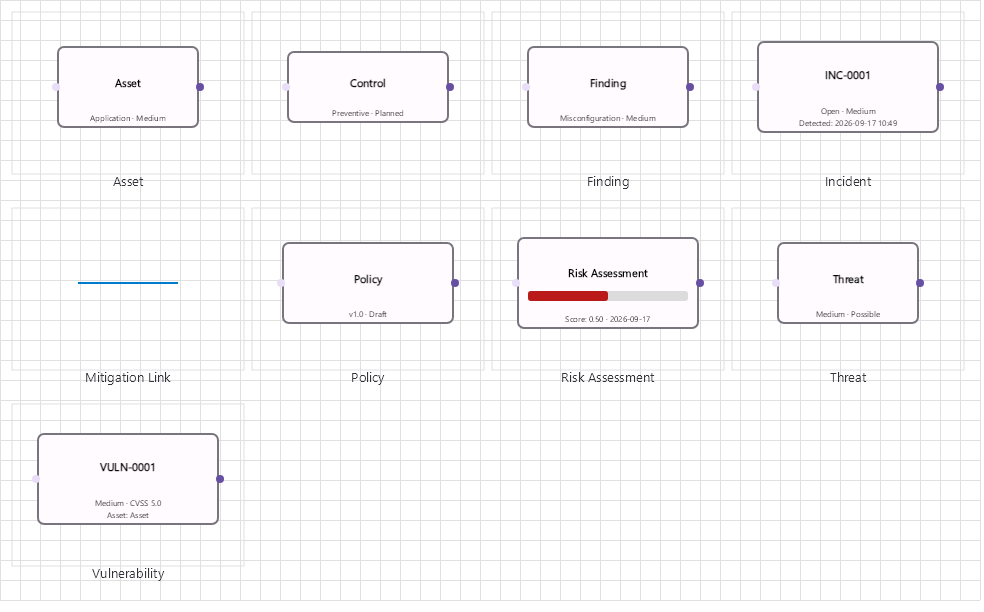
Overview
Base Control: SecurityControl : MaterialControl
Namespace: Beep.Skia.Security
The SecurityControl is the root control for this diagram family. It inherits MaterialControl and provides shared port management, styling, and template methods for all nodes in the family.
This family contains 9 node types.
Node Types
| Node Class | Shape | Description |
|---|---|---|
AssetNode | Diamond/server | Valuable asset (data, system, service, personnel). |
ThreatNode | Lightning bolt | Threat actor/event with type, likelihood, and impact. |
ControlNode | Shield | Security control/safeguard (preventive, detective, corrective). |
VulnerabilityNode | Crack/broken shield | Vulnerability with CVE, CVSS score, and remediation. |
PolicyNode | Document | Security policy/standard with compliance mapping. |
RiskAssessmentNode | Risk matrix | Risk assessment: inherent and residual risk levels. |
IncidentNode | Alert triangle | Security incident with timeline and response status. |
FindingNode | Checklist/document | Audit/assessment finding with recommendation. |
MitigationLink | Dashed line | Mitigation relationship: control mitigates threat/vulnerability. |
AssetNode
Valuable asset (data, system, service, personnel).
| Shape | Diamond/server |
|---|---|
| Input Ports | 1+ |
| Output Ports | 2+ |
ThreatNode
Threat actor/event with type, likelihood, and impact.
| Shape | Lightning bolt |
|---|---|
| Input Ports | 2+ |
| Output Ports | 2+ |
ControlNode
Security control/safeguard (preventive, detective, corrective).
| Shape | Shield |
|---|---|
| Input Ports | 1+ |
| Output Ports | 1+ |
VulnerabilityNode
Vulnerability with CVE, CVSS score, and remediation.
| Shape | Crack/broken shield |
|---|---|
| Input Ports | 1 |
| Output Ports | 1 |
PolicyNode
Security policy/standard with compliance mapping.
| Shape | Document |
|---|---|
| Input Ports | 1 |
| Output Ports | 1 |
RiskAssessmentNode
Risk assessment: inherent and residual risk levels.
| Shape | Risk matrix |
|---|---|
| Input Ports | 2+ |
| Output Ports | 1+ |
IncidentNode
Security incident with timeline and response status.
| Shape | Alert triangle |
|---|---|
| Input Ports | 1 |
| Output Ports | 1 |
FindingNode
Audit/assessment finding with recommendation.
| Shape | Checklist/document |
|---|---|
| Input Ports | 1 |
| Output Ports | 1 |
MitigationLink
Mitigation relationship: control mitigates threat/vulnerability.
| Shape | Dashed line |
|---|---|
| Input Ports | 0 |
| Output Ports | 0 |
Connection Points
Every node in this family exposes connection points (ports) for linking to other nodes. Port positions are computed lazily by LayoutPorts(), which runs when MarkPortsDirty() flags the layout as stale after a move or resize.
| Node Class | Input Ports | Output Ports | Extra |
|---|---|---|---|
AssetNode | 1+ | 2+ | — |
ThreatNode | 2+ | 2+ | — |
ControlNode | 1+ | 1+ | — |
VulnerabilityNode | 1 | 1 | — |
PolicyNode | 1 | 1 | — |
RiskAssessmentNode | 2+ | 1+ | — |
IncidentNode | 1 | 1 | — |
FindingNode | 1 | 1 | — |
MitigationLink | 0 | 0 | — |
Connection Conventions
When building diagrams with this family, follow these conventions:
- Assets connect to threats they face
- Controls mitigate threats and reduce vulnerabilities
- Vulnerabilities link to assets they affect
- Mitigation links use dashed lines to distinguish from data flow
Usage Example
Complete example showing creation, node placement, and connection:
C# Example
var sec = new SecurityControl
{
    X = 50, Y = 50,
    Width = 700, Height = 500
};
drawingManager.AddComponent(sec);

var asset = new AssetNode
{
    X = 100, Y = 150,
    Text = "Customer Database",
    AssetType = "Data"
};
var threat = new ThreatNode
{
    X = 350, Y = 80,
    ThreatType = "SQL Injection",
    Severity = "High"
};
var control = new ControlNode
{
    X = 350, Y = 220,
    ControlType = "Input Validation",
    ControlCategory = "Preventive"
};
var vuln = new VulnerabilityNode
{
    X = 600, Y = 150,
    CVE = "CVE-2023-XXXXX"
};

drawingManager.AddComponent(asset);
drawingManager.AddComponent(threat);
drawingManager.AddComponent(control);
drawingManager.AddComponent(vuln);

drawingManager.ConnectComponents(asset.OutPoints[0], threat.InPoints[0]);
drawingManager.ConnectComponents(threat.OutPoints[1], vuln.InPoints[0]);
drawingManager.ConnectComponents(control.OutPoints[0], threat.InPoints[1]);
STRIDE Analysis
StrideAnalyzer.Analyze(components) inspects the diagram's asset nodes and produces a threat list. Each threat records its STRIDE category, the asset it affects, a suggested mitigation, a severity, matching MITRE ATT&CK techniques and a DREAD score:
| Member | Type | Description |
|---|---|---|
Analyze(components) | void | Runs the analysis and fills Threats. |
Threats | List<ThreatResult> | One entry per discovered threat. |
ThreatResult.Category | StrideCategory | Spoofing, Tampering, Repudiation, Information disclosure, Denial of service or Elevation of privilege. |
ThreatResult.AssetName / Threat / Mitigation | string | What is at risk, what the threat is and how to mitigate it. |
ThreatResult.Severity | string | Low, Medium or High. |
ThreatResult.Techniques | List<MitreTechnique> | Mapped ATT&CK techniques (id, name, tactic). |
ThreatResult.Dread | DreadScore | Risk score for the threat. |
var analyzer = new StrideAnalyzer();
analyzer.Analyze(drawingManager.GetComponents());

foreach (var threat in analyzer.Threats)
    Console.WriteLine($"[{threat.Category}] {threat.AssetName}: {threat.Threat} " +
                      $"(DREAD {threat.Dread.Average:0.0}, {threat.Dread.RiskLevel})");
DREAD Scoring
DreadScore rates five dimensions and derives an average and a risk level:
| Member | Type | Description |
|---|---|---|
Damage, Reproducibility, Exploitability, AffectedUsers, Discoverability | DreadRating | Each rated Low, Medium or High (default Medium). |
Average | double | Mean of the five ratings. |
RiskLevel | string | Band derived from the average. |
DreadCalculator builds scores from a ThreatNode, from severity/likelihood pairs, or from their string names, so threat tables can be scored in bulk.
MITRE ATT&CK Mapping
MitreAttackLibrary ships a technique catalog and maps STRIDE categories onto it:
| Member | Description |
|---|---|
Techniques | All catalogued techniques (MitreTechnique: Id, Name, Tactic). |
Tactics | Distinct tactic names, for grouping in reports. |
ForStrideCategory(category) | Techniques relevant to a STRIDE category. |
Find(id) | Lookup by technique id (for example T1190). |